

Getting started with SCRAM Touchpoint app
The pre-trial program allows you to complete your regular check-in via the SCRAM Touchpoint app. You must complete your regular check-in on the day assigned to you by your Probation Officer. Please keep in mind, your probation officer may also direct you to report in person for other reasons.
In order to download the app, you will need an iPhone or android phone that has a camera and wifi access. Your phone also needs to have access to your fingerprint or facial recognition.
Apple App Store Link
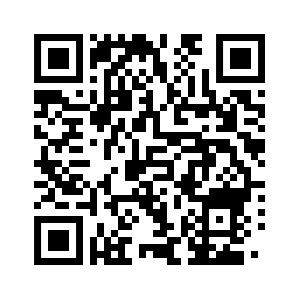
Android App Store
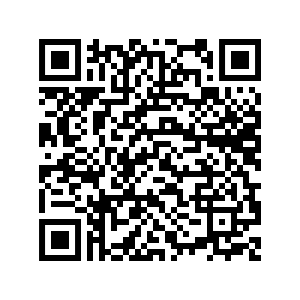
Instructions
Step 1.
Go to your app store and type the word TouchPoint SCRAM
Step 2.
Select your region --- US
Step 3.
Ask one of the Probation officers in The Pre-trial unit for your username and password. Your password is case sensitive.
Step 4.
Log in with your credentials.
Step 5.
Accept all the terms and conditions.
Step 6.
If English is not your native language, go to the right top corner, click on language, select your preferred language, and click apply.
Step 7.
If you see a red message asking for permission to use the app
Click the message or go to your setting, find the location tab, and allow permission for the app to access your location at all times. This is just while using the app.
We do not track your location, and this is only required the first time.
Step 8.
If you have your fingerprint or facial recognition, set up, you can skip the next step.
Otherwise, go to your settings find the fingerprint tab or face recognition tab based on your phone preference, and set up your fingerprint or face recognition.
Step 9.
Now your app is ready to go, and you need to complete your first check in.
Step 10.
Click check in. You now are being presented by a series of questions. Answer all the questions, and please let us know if you are confused by any question. Click next and take a selfie, do not wear any glasses, hats, and turn on the lights in the room. Click use photo and submit. Then your check in is loading. You must see a message that says “message submitted on (date)” if you do not see this message, your check-in was not submitted.
You can also explore extra features:
Messages:
Before you leave the office, read the message and answer. We are able to see every time you open a message, so we expect a prompt reply. This is a great way to communicate with your Probation officer, you can ask us any question related to your case and we will answer you in a timely manner.
Documents:
You can upload and share document with your Probation Officer such as proof of your AA meetings. Don’t forget to give us access to the documents.
Reminders:
You can see any upcoming events such as upcoming check-ins.
Events:
You have access to your monthly calendar which includes your upcoming hearings.
Resources:
You can access community services information, Marin County courthouse location, pretrial services, and substance abuse treatment information.
We are here to help, inform us about your specific needs and will direct you with the appropriate community resources.